
Payroll is the heartbeat of the business – but too often, it’s under-resourced, rushed and manually run.
That’s why Gemma McDonnell-Mossop from Payroll Edge Consulting and Peter Forbes from Paytools hosted the Power Up Your Payrun webinar – to help payroll professionals take control of their processes and reduce chaos, errors and late nights.
In this blog, we’ll walk you through key insights from the session and we also have a payroll processing best practice framework that’s free for you to download.
🧩 The Four-Box Framework
At the core of running pays lies four essential components:
-
- Master File Management – Who’s on your payroll? Contracts, variations, terminations – this is your foundational data.
- Time and Leave – Timesheets, absences, leave approvals. Know who worked (and who didn’t).
- Validation and Verification – Cross-checking data, catching exceptions and ensuring accuracy.
- Disbursements and Reporting – Getting the money to the right place (banks, super funds, government) and sharing the right data internally.
Organising your payroll processing around these four “boxes” helps simplify and standardise every pay cycle – no matter the size of your team. This makes it easy to figure out what you need to do – the hard part is understanding when you should do it.
Timing is the key to building good payroll processes. You need to make sure that you set each task at the right stage of the life cycle, as well as giving your team enough time to complete each task.
🎈 The Payroll “Balloon” Metaphor
Gemma introduced a brilliant analogy: think of your payroll timeline like a balloon.
-
- One wall is payday — immovable and fixed.
- The other wall is the start of your process.
- Every delay or missed deadline compresses the balloon.
- Eventually… it bursts. The balloon that bursts is our sanity, our patience, our ability to do other things that help add value to the business. So, it’s really important that we’re not exploding balloons left, right and centre.

The key takeaway? Build your schedule backward from payday, allowing breathing room for every phase – from data collection to final approvals.
🛠️ Avoiding Common Pitfalls
Here’s a few traps that we’ve seen over and over:
-
- Unrealistic or unenforced cutoff times for timesheets.
- A culture of just-in-time processing, leaving no room for error.
- Manual spreadsheets used for tracking adjustments or approvals.
- Lack of clarity about who’s responsible for each part of the process.
If any of these sound familiar, it may be time for a full review of your payroll calendar, tools and team roles.
📅 Designing a Smarter Payroll Schedule
A sustainable payroll processing schedule includes:
✅ Clearly defined cutoffs (and sticking to them!)
✅ Working backward from payday to create realistic timelines
✅ Adding “gates” or milestones to catch issues early
✅ Training new managers and providing dashboards for self-service
✅ Documenting not just what happens, but why
Most importantly: Plan → Review → Replan. A schedule isn’t something you create once and forget. As your team, systems or legislation changes, your process should evolve too.
💡 Tech to the Rescue: Paytools
Toward the end of the webinar, Peter introduces Paytools, a platform purpose-built for payroll. While many teams are stuck using spreadsheets and email chains, Paytools offers:
☑️ Live Schedule & Recurring Checklists
Reusable checklist templates that allow you to reflect the different stages in payroll processing. There are a number of template types depending on what process you’re running.

Once you’ve got your basic payroll processing stages set up as checklists, you can lock in the key dates and times for all your tasks. In Paytools, we’ve made this very simple using “pay groups” for every pay. Each group will have a processing start date, a period end date and the set pay day.

Schedule your checklists against the pay group to run every pay period:
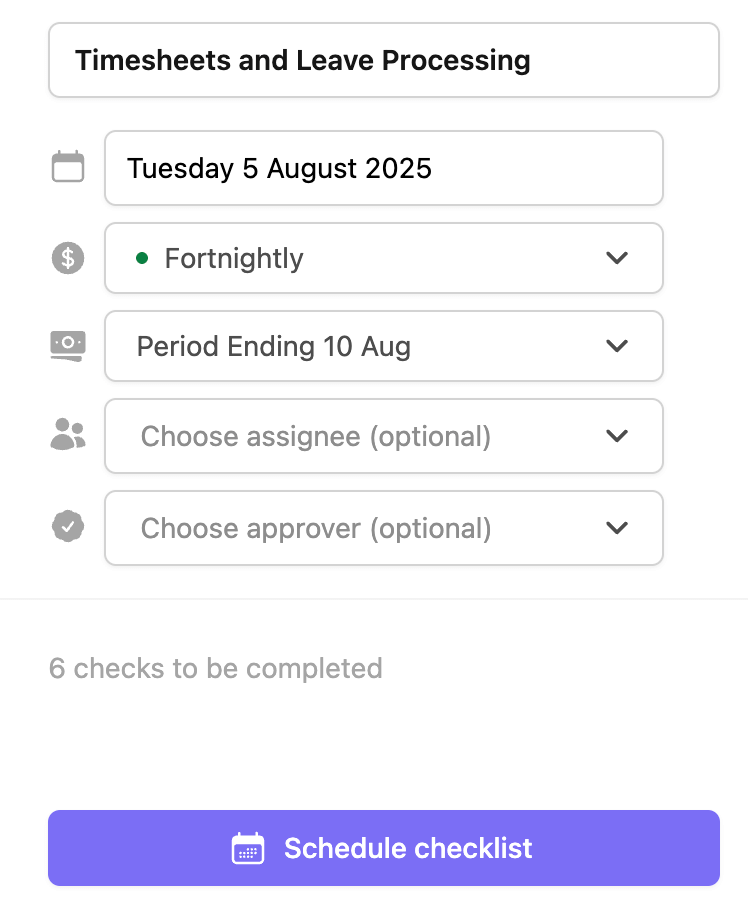
The end result? You’ll get a detailed payroll processing checklist that’s fast and easy to complete. Each time your team runs the pay, they’ll be able to access detailed instructions and you can easily see who did the work and when.
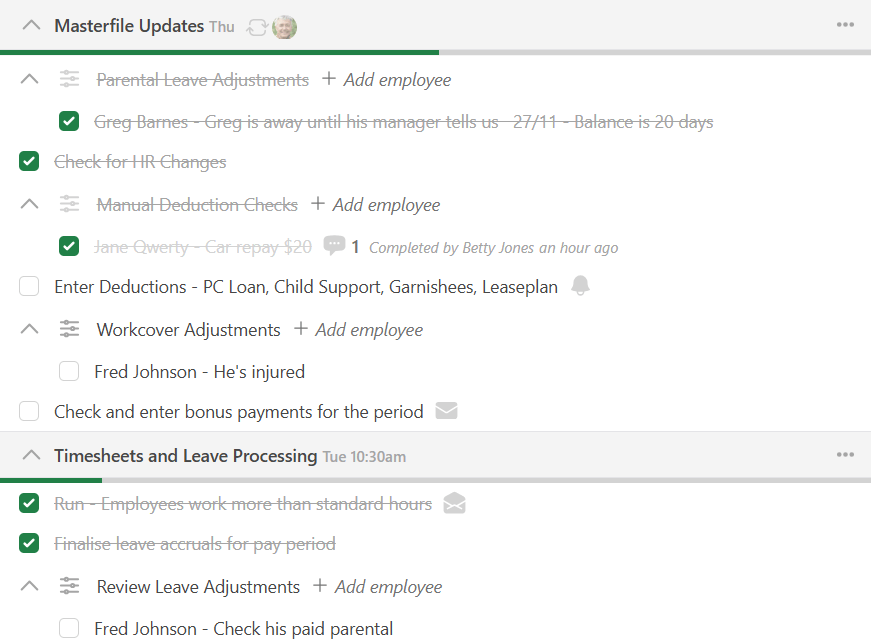
No more messy Excel checklists or duplicate versions of processes. Paytools is your source of truth for how work gets done, as well as your repository for checking and completing the payroll tasks.
✍️ Better Handling of Employee Adjustments
From what we can tell, employee adjustments are usually manually tracked and monitored because of deficiencies in the payroll system. An employee adjustment can be anything from recording someone’s parental leave, a one off deduction or an allowance.
In Paytools, you can configure payrun checks that can record adjustments. There may be many places throughout the pay run where employee adjustments need to be checked (depending on the type). Once added, adjustments will automatically appear in each pay period according to their set duration.

💬 Improved Team Collaboration
When it comes to running pays, communication is big. There’s a lot of ongoing communication between the payroll team and stakeholders who want to stay informed about how payroll is progressing. Here’s some features in Paytools that can make this process a whole lot easier:
Pay Team Rotations
With larger payroll teams it can become important to rotate tasks between team members each payrun. In Paytools, you can set up auto rotation rules to rotate individual checks or a whole checklist between team members each pay period.
We also provide the flexibility to adjust rotations or reassign tasks if someone is unavailable.

Team Communication
In just about every payroll processing checklist, I see notes to send emails out to certain people notifying them of a particular milestone in the process. Sending of these emails is usually manual i.e. payroll composes an email and sends it out from their personal inbox.
Paytools allows you to easily configure completion notifications to automatically go out when a task is complete.

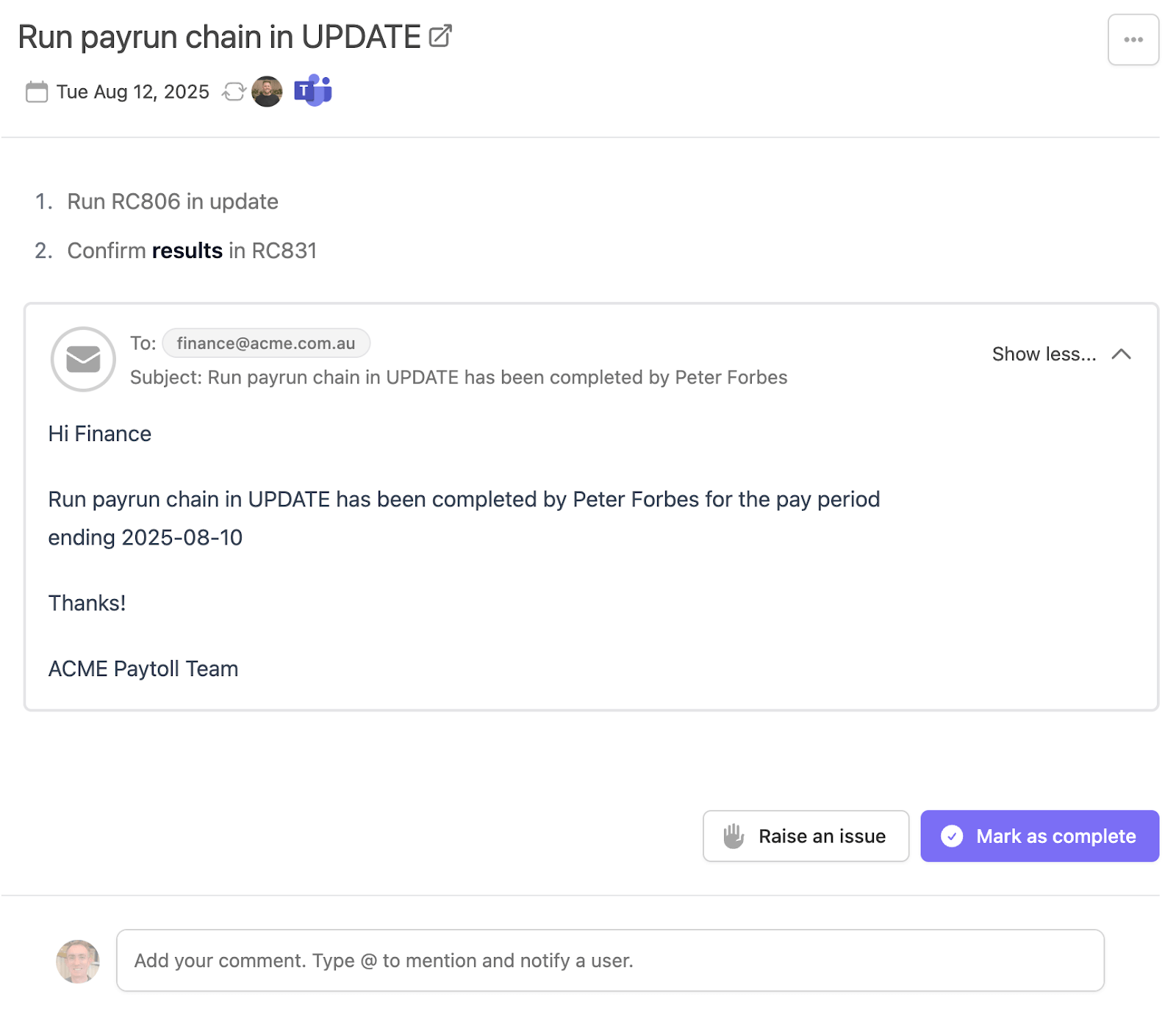
At Paytools, we’re not big fans of sending a lot of emails, as we all suffer from inbox congestion. If you’re using MS teams, you can configure notifications to go to shared team channels. You can also automate a daily digest notification in MS Teams to individually go to any team member with upcoming tasks that day.

Guest Users
Another step in pay processing which requires a lot of manual work is getting approval from external stakeholders. Paytools lets you create guest users who can be assigned specific checklist tasks, while restricting their access to the rest of the system.
Why Paytools?
A few reason’s why our customer’s love using Paytools:
-
- Better visibility and monitoring of who did what work (with supporting information and comments).
- Improved governance with formalised controls and approvals.
- New starters can easily pick up tasks thanks to clear process documentation.
- Technology that encourages continuous improvement for your people and processes.
🧠 Final Thoughts
There is so much more involved in payroll processing that we haven’t spoken about. However, the areas we’ve covered in this blog contain low hanging fruit to make big gains in accuracy and efficiency.
Ready to adopt best practice payroll processing? Start with a conversation – with your team, your systems and yourself. And don’t forget to review and replan. 🚀
📌 Take a quick self-guided tour of our payroll operations feature in Paytools.
📌 Visit payrolledge.com.au to learn how Gemma and her team can help your business do payroll better