A Better Way to Manage Payroll Adjustments
Payroll adjustments don't belong in messy spreadsheets. With Paytools, you can record, track, and complete them right in your payrun checklist — simple, transparent, and stress-free.
If you work in payroll, you already know this story: somewhere in your files there's a spreadsheet full of notes, reminders and one-off fixes for employees in the payrun.
It's the "adjustments list."
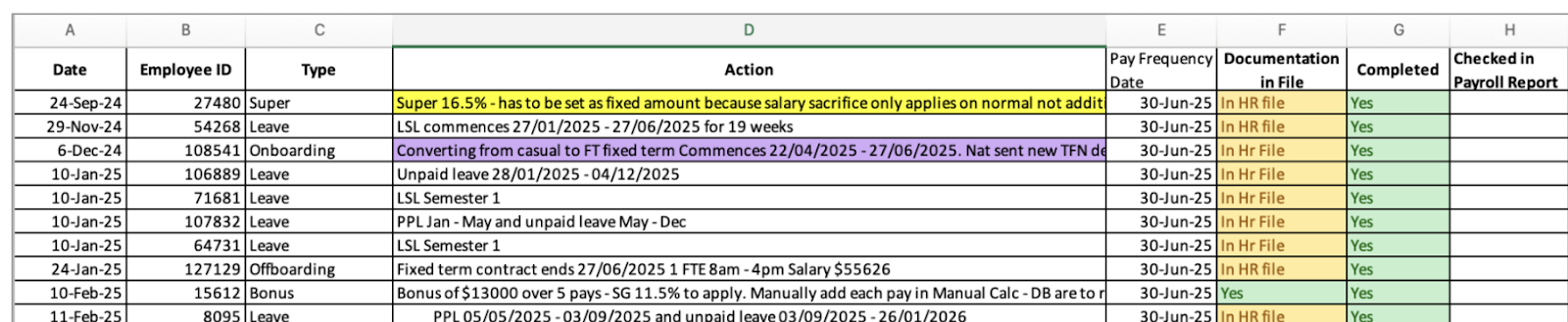
Sometimes it's tracking higher duties allowances. Sometimes it's remembering to deduct an overpayment. Sometimes it's a sticky note telling you to check a new hire's leave balance, or a calendar reminder to pay a recurring bonus.
Whatever form it takes, these adjustments are everywhere. And if you're like most payroll managers, you're juggling them in ways your payroll system just wasn't designed for.
How it's done today
Right now, adjustments are usually:
That means:
Payroll people are resourceful – so you've made it work. But let's be honest: it's clunky, error-prone and way too dependent on spreadsheets.
Creating "better" practice with Paytools
Paytools takes this messy process and turns it into an airtight workflow, built right into your payrun checklist. No more chasing scattered notes or re-inventing spreadsheets every cycle.
Here's how it works:
Record adjustments where they belong
With Paytools, you can record adjustments directly against employees. That could mean:
Each adjustment can have a start and end date (or number of payruns), a description and even notes or files attached. If it's a dollar-based adjustment, you can capture that too.
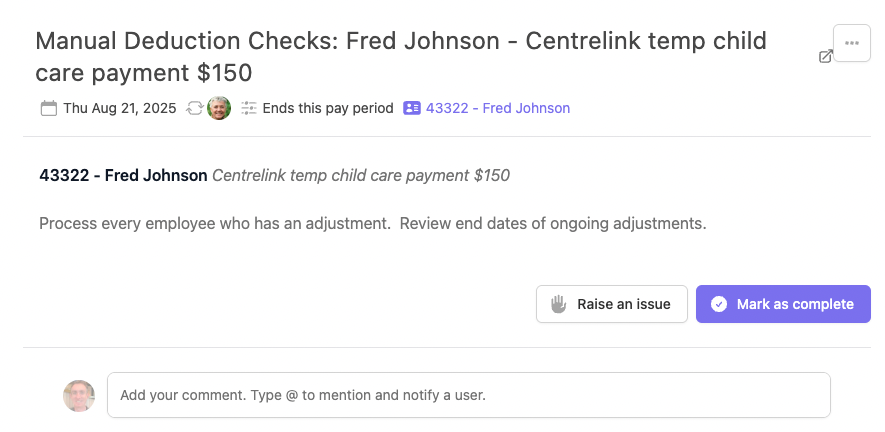
See adjustments in your checklist
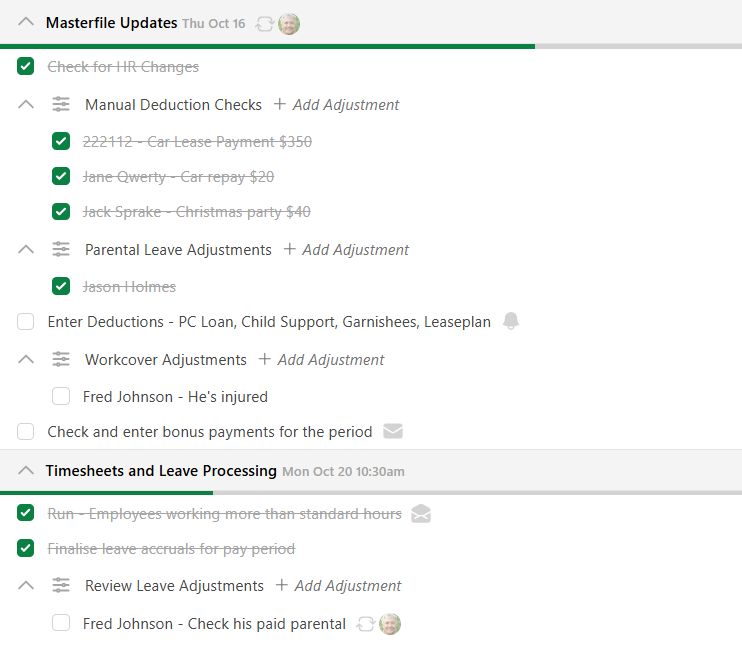
Instead of hiding in a spreadsheet, adjustments appear in your Paytools pay processing checklist. They sit alongside your other checks, so you can manage them in context.
When the adjustment applies for this period, it's displayed clearly under the employee's name. One click to mark it complete, with the system keeping a secure record of who checked it and when.
Keep history, reduce risk
Every adjustment you process is logged. That means no more wondering: Did we do that last time? Who signed it off? Paytools keeps the history for you – improving transparency and making audits a whole lot easier.
Handle all the messy realities
Because payroll is never one-size-fits-all, Paytools supports the full spectrum of adjustments:
Some adjustments last a week. Some stretch over months. Some keep coming back every cycle. Paytools handles them all – without making you reinvent the wheel each time.
Why this matters for payroll managers
This isn't just about making life easier (though it definitely does that). It's about building payroll processes that are:
Time to ditch the spreadsheet
Payroll adjustments will always exist. They're part of the job. But the way you manage them doesn't have to stay stuck in 1999.
Paytools gives you a clear, reliable, best-practice way to handle adjustments – right where payroll work actually happens.
So instead of wrestling with ad-hoc files and sticky notes, you and your team can focus on what you do best: getting people paid right, every time.
If you'd like to learn more about Paytools, book a demo today!